AI can be incredibly helpful. It can also be frustrating.
Most of the time, the difference is not the AI model. It’s the prompt.
A prompt is simply what you ask the AI to do. If your prompt is vague, the AI has to guess. If your prompt is clear, the AI can focus.
This guide is a plain-English checklist you can use before you write any prompt. It’s not about fancy tricks. It’s about giving the AI the right information so you get useful results.
The big idea: AI is a smart intern, not a mind reader
Think of an AI assistant like a very fast, very capable intern.
- It can write, summarize, brainstorm, and structure information.
- It can follow instructions.
- It can make reasonable assumptions.
- But it doesn’t know what you mean unless you tell it.
If you say “Write a blog post,” the AI has to guess:
- Who is it for?
- What’s the goal?
- What tone should it use?
- How long should it be?
- What should it include or avoid?
Your job is to remove guessing.
Before you write the prompt, decide these 7 things
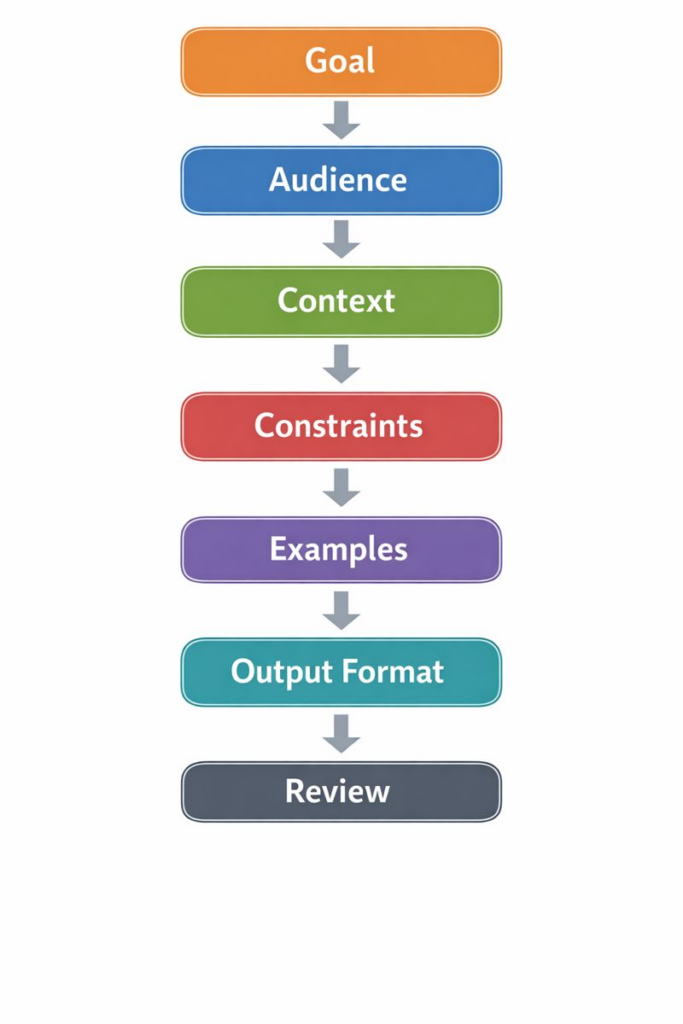
If you only remember one part of this guide, remember this: decide what “good” looks like before you ask the AI to create it.
Here are the seven decisions that make the biggest difference.
1) The goal (what you want the output to do)
Be specific about the job.
Bad:
- “Help me with marketing.”
Better:
- “Write a landing page that gets people to book a discovery call.”
Even better:
- “Write a landing page for our managed IT service that gets UK business owners to book a 15-minute call. The page should reduce fear about switching providers.”
Ask yourself:
- What action should the reader take?
- What should they think or feel after reading?
- What problem are we solving?
2) The audience (who it’s for)
The same message changes depending on who reads it.
Examples:
- A founder who hates jargon
- A technical IT manager who wants details
- A finance director who cares about risk and cost control
Tell the AI:
- Who the reader is
- What they already know
- What they care about
- What they are worried about
3) The context (what the AI must know)
Context is the “background info” the AI needs to do a good job.
Include things like:
- What your product or service does
- What makes you different
- What you’ve already tried
- Any facts the AI should use
If you don’t provide context, the AI will fill the gaps with generic content.
A simple rule:
- If the AI would need to ask you a question, put the answer in the prompt.
4) The constraints (what it must and must not do)
Constraints prevent the AI from going off track.
Common constraints:
- Length: “800–1,200 words”
- Reading level: “plain English, short sentences”
- Tone: “calm, confident, not salesy”
- Avoid: “no hype, no buzzwords, no emojis”
- Include: “must include a checklist and 3 examples”
Constraints are not “being picky.” They are how you get consistent output.
5) The format (what the output should look like)
AI is much better when you specify the format.
Examples:
- “Use headings and short paragraphs.”
- “Give me a table with 3 columns: Problem, Why it matters, What to do.”
- “Give me 10 options as a numbered list.”
If you want something you can copy into a tool (WordPress, Notion, email), say so.
6) The examples (what “good” looks like)
Examples are one of the fastest ways to improve results.
You can provide:
- A sample paragraph you like
- A competitor’s style (without copying)
- A previous email that performed well
- A list of phrases you want to sound like
Even a small example helps.
For instance:
- “Write like this: clear, direct, short sentences. No fluff.”
7) The success criteria (how you’ll judge the result)
Tell the AI how you will measure “done.”
Examples:
- “If someone reads it, they should understand the offer in 10 seconds.”
- “It must answer these 5 objections.”
- “It must include a CTA and a FAQ section.”
This turns your prompt into a brief.
A simple prompt formula you can reuse
Here’s a plain template that works for almost anything.
- Role: “You are a [type of expert].”
- Task: “Create [thing].”
- Audience: “It’s for [who].”
- Context: “Here’s what you need to know: [facts].”
- Constraints: “Follow these rules: [rules].”
- Format: “Output it as: [structure].”
- Check: “Before you finish, verify: [criteria].”
You don’t need to use all seven every time. But the more important the work, the more you should include.
Copy-paste prompt templates (practical)
Use these as starting points.
Template 1: Write a blog post
- Topic: [topic]
- Goal: [what the post should achieve]
- Audience: [who it’s for]
- Key points to include: [bullets]
- Things to avoid: [bullets]
- Tone: [plain, friendly, direct]
- Length: [word count]
- Format: [headings, short paragraphs, checklist]
- CTA: [what you want the reader to do]
Prompt:
“Write a blog post about [topic]. It’s for [audience]. The goal is [goal]. Include these points: [points]. Avoid: [avoid]. Use [tone] tone. Keep it [length] words. Use headings, short paragraphs, and a checklist at the end. Finish with a CTA to [CTA].”
Template 2: Improve something you already wrote
Prompt:
“Rewrite the text below to be clearer and easier to read. Keep the meaning the same. Remove hype and buzzwords. Use short sentences. Keep it under [X] words. Here is the text: [paste].”
Template 3: Get options fast (names, headlines, hooks)
Prompt:
“Give me 20 headline options for [topic]. Audience: [audience]. Tone: [tone]. Avoid these words: [list]. Mix short and long options. Output as a numbered list.”
Template 4: Turn messy notes into something usable
Prompt:
“Turn these notes into a clear one-page summary. Audience: [audience]. Goal: [goal]. Use headings and bullet points. If anything is missing, list questions at the end. Notes: [paste].”
Template 5: Customer support reply
Prompt:
“Write a calm, helpful reply to this customer. Apologize once, then focus on solving the issue. Ask up to 2 questions if needed. Keep it under 150 words. Customer message: [paste].”
What to include in a prompt (the “minimum viable brief”)
If you want the shortest possible prompt that still works well, include:
- What you want
- Who it’s for
- The key points
- The format
Example:
“Write a 900-word blog post for small business owners about why phishing training matters. Include 5 real-world examples, a short checklist, and a FAQ. Use plain English.”
That’s already far better than “Write about phishing.”
What to avoid (common prompt mistakes)
Here are the mistakes that cause generic, wrong, or messy output.
Mistake 1: Being vague
“Make it better.”
Better:
- “Make it clearer. Shorter sentences. Remove buzzwords. Add a stronger CTA.”
Mistake 2: Asking for too much at once
If you ask for 12 different things, the AI may do all of them poorly.
Better approach:
- Step 1: Ask for an outline.
- Step 2: Choose the angle.
- Step 3: Ask for the full draft.
- Step 4: Ask for edits.
Mistake 3: Not giving the AI your “house rules”
If you have a style you like, say it.
Examples:
- “No emojis.”
- “Use British English.”
- “Avoid words like ‘revolutionary’ and ‘game-changing’.”
Mistake 4: Forgetting the reader
A prompt that focuses only on what you want can miss what the reader needs.
Add:
- “Include common objections and answer them.”
Mistake 5: Not specifying the output format
If you don’t specify format, you may get a wall of text.
Ask for:
- headings
- lists
- tables
- sections
How to iterate: the fastest way to get great output
Most strong AI outputs come from two or three rounds.
Here’s a simple loop:
- Ask for an outline.
- Pick the best angle.
- Ask for the full version.
- Ask for a “tighten and simplify” edit.
Example follow-up prompts:
- “Give me 3 outline options with different angles.”
- “Write the full draft using outline #2.”
- “Now cut 20% of the words without losing meaning.”
- “Make the intro stronger and more direct.”
- “Add a FAQ with 6 questions.”
How to handle facts (so you don’t publish mistakes)
AI can sound confident even when it’s wrong.
If your content includes:
- statistics
- legal claims
- medical advice
- pricing
- competitor comparisons
- security claims
…you must verify.
A good prompt includes a rule like:
- “If you are not sure, say you are not sure. Do not invent numbers.”
And a good workflow includes:
- checking sources
- checking your own documentation
- checking dates
A quick checklist you can use every time
Before you hit send, ask:
- Did I say what I want?
- Did I say who it’s for?
- Did I include the key facts?
- Did I set constraints (tone, length, avoid list)?
- Did I ask for a format?
- Did I include an example (if needed)?
- Did I define what “good” looks like?
If you can answer “yes” to most of these, your prompt will be strong.
Example: turning a weak prompt into a strong one
Weak:
“Write a LinkedIn post about cybersecurity.”
Strong:
“Write a LinkedIn post for UK business owners with 10–250 employees about why phishing is still the #1 risk. Tone: calm, practical, not fear-based. Length: 180–220 words. Include 3 bullet points with simple actions. End with a question that invites comments. Avoid jargon.”
Notice what changed:
- audience is clear
- topic is specific
- tone is defined
- format is defined
- outcome is defined
Final thought: clarity beats cleverness
The best prompts are not fancy.
They are clear.
If you can explain the task to a human in a few sentences, you can explain it to an AI.
Start with the goal. Add context. Set rules. Ask for a format.
Then iterate.
No responses yet