Architect: Building the Thing That Builds Things
There’s a particular kind of magic in tools like v0, Bolt, and Claude Code — you describe what you want, and software appears. Not a snippet to copy, not a tutorial to follow. The actual thing, running, in front of you. I wanted to understand that magic by building my own version of it, self-hosted, on my own server. I called it Architect.
This is the story of that project — what it is, the one design mistake that nearly sank it, and how chasing that mistake led to a much better system than I’d originally planned.
The idea
Architect is a chat that builds software in real time inside a project folder.
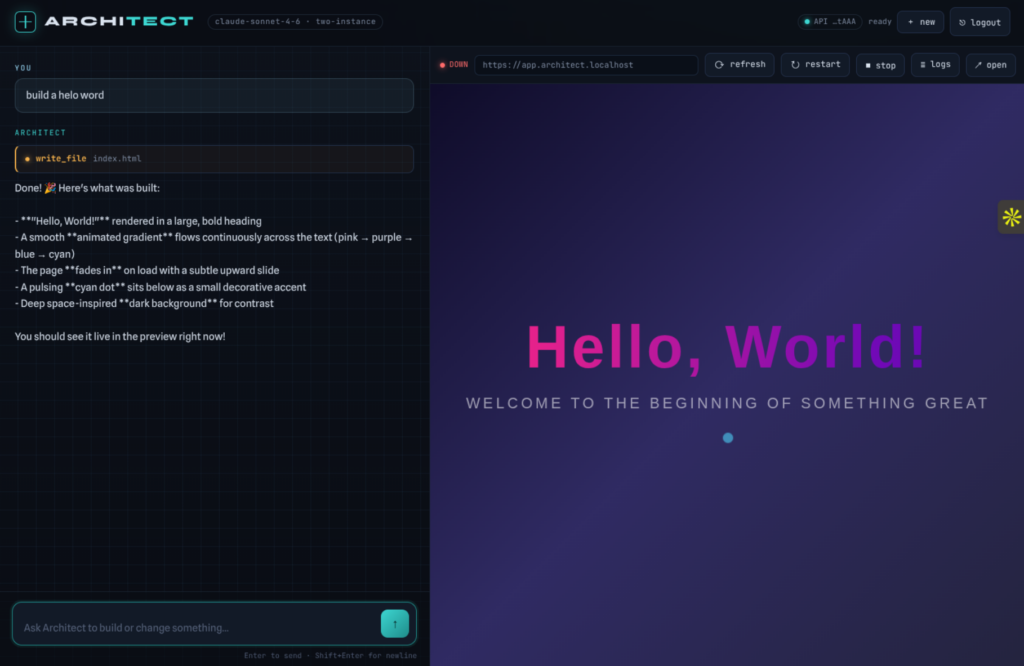
You open it, you type “build me a portfolio site for a photographer,” and it goes to work — writing files, running commands, scaffolding the project. A live preview sits next to the chat and refreshes as the work happens, so you watch the site take shape while you’re still describing it. Then you keep going: “make the header sticky,” “redo it in dark mode,” “add a contact form.” Each message is a new instruction, and Architect edits what already exists rather than starting over.
Under the hood it’s an AI agent with a small, sharp set of tools — run a shell command, write a file, read a file, list files — all locked to a single project folder. The agent runs in a loop: the model asks to use a tool, the server runs it, the result comes back, and this repeats until the request is done. Every step streams into the chat, so you’re never staring at a spinner wondering what it’s doing. You see it think, write, run, and report.
That’s the whole pitch: you describe, it builds, you watch.
The mistake that taught me everything
My first version had the chat and the project it was building running in the same process. The same server. The same runtime. It seemed simpler — one thing to start, one thing to manage.
It was a trap.
Here’s the problem. The whole point of Architect is that it builds real, running software. But real running software crashes. It hangs. It gets stuck in infinite loops. It leaks memory. And if the project shares a runtime with the chat, then the moment the project breaks, the chat breaks with it. The agent that’s supposed to fix the broken project goes down at exactly the moment you need it most. Worse, the two could take turns crashing each other in a loop — the project falls over, the chat falls over, you restart, it happens again.
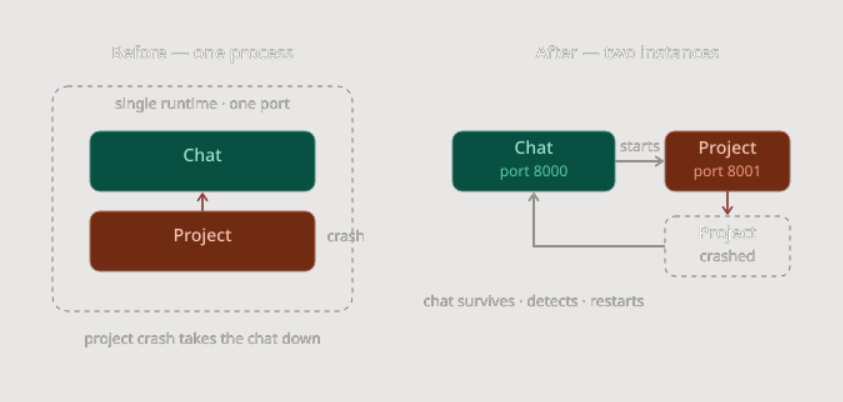
I’d built a system where the firefighter lived inside the burning building.
The realization reframed the entire project. The chat isn’t just a UI that happens to run code. It’s a control plane — a stable supervisor whose first job is to stay alive no matter what the project does. And that’s only possible if the project runs somewhere else entirely.
Two instances, not one
The fix was to split Architect into two completely independent pieces that never share a process, a runtime, or a port.
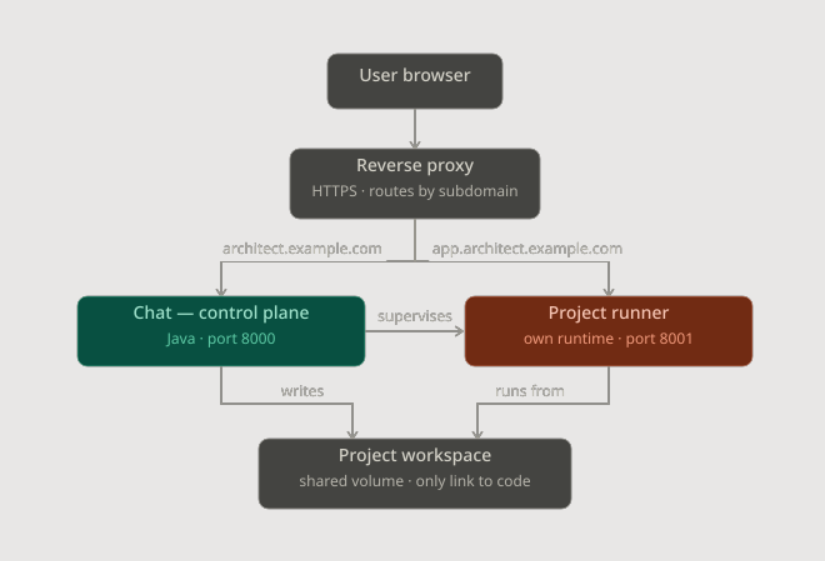
The chat (the control plane) runs on its own port — say 8000. It hosts the chat UI, talks to the AI, runs the agent loop, and edits files. Crucially, it never runs the built project’s code inside itself. Its only relationship to the running project is as a supervisor: it can start it, stop it, restart it, check its health, and read its logs. That’s the entire contract. Because it never executes the project, nothing the project does can knock it over.
The project runner runs on a different port — say 8001 — as a separate process with its own runtime. And here’s a detail I got wrong at first: that runtime doesn’t have to match the chat’s. The chat is Java; the project might be Node, or Python, or just static HTML served by something tiny. They’re different worlds. If the project crashes, loops, or hangs, only the runner is affected. The chat on 8000 notices, kills it if needed, and reports the failure back into the conversation so the agent can fix it.
The link between them is deliberately thin. The chat supervises the runner through start/stop/restart commands, polls its health, and captures its output as a log stream. No shared memory. No shared runtime. No shared port. There’s simply no path for a failure to cascade from one to the other.
It’s the difference between a pilot and a plane versus a pilot strapped to an engine.
What happens when you hit “re-run”
This split makes the most common action — rebuilding after a change — boringly safe, which is exactly what you want.
When you ask for a change, the chat never restarts. Only the project does. The supervisor stops the current project process (gracefully first, then a force-kill if it refuses to die), waits for the port to actually free up, starts a fresh process with the new code, and health-checks it. If it comes up clean, the preview reloads. If it fails to start, that error lands in the chat as something the agent can work on — not as a silent failure, and never as something that takes the chat down with it.
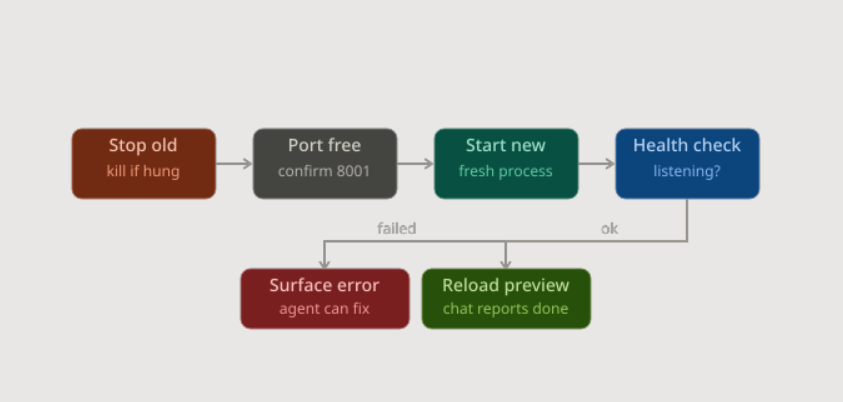
The rule that makes this reliable is simple: a re-run is always “kill the old one completely, then start a clean new one” — never “start another one alongside.” Two processes fighting over the same port is a classic, maddening bug, and the supervisor’s job is to make sure it can’t happen. You can rebuild as many times as you like, as fast as you like, and the chat just keeps narrating the results.
Connecting it to Claude — the right way
Architect needs an AI brain, which means connecting it to Anthropic’s models. The tempting shortcut was to let users “link their Claude Pro or Max subscription” the way the official CLI does. I’m glad I checked before building it, because that path is off-limits: subscription login is reserved for Anthropic’s own first-party apps, and routing a third-party product’s requests through it violates their terms and can get user accounts banned.
The compliant path — and, it turns out, the cleaner design anyway — is an API key from the Anthropic Console. So Architect opens with a simple “connect your account” screen: paste your key, it gets validated, you’re in. The key is billed per token on your own Console account, stored server-side, never exposed to the browser, and never readable from inside the project sandbox. There’s a clear connected/disconnected status and a way to swap or remove it. One honest screen, no terms-of-service landmines.
Locking the front door
Once you deploy something that can run shell commands on your server, security stops being optional. Architect’s chat is gated behind real authentication before any building is possible: a username and password as the first factor (passwords stored only as argon2id hashes, never plaintext), and a one-time code emailed to the user as a second factor. Sessions are issued only after both pass, login endpoints are rate-limited against brute force, and the whole thing runs over HTTPS only.
The project folder is the only place the AI’s tools — and the running project — can touch. Nothing outside it is reachable. The firewall and the folder boundary are doing as much work as the login screen.
Shipping it
The two-instance design maps almost perfectly onto Docker Compose, which is how Architect deploys: three services on an internal network. A Caddy reverse proxy out front handles automatic HTTPS and routes by subdomain — architect.example.com to the chat, a separate subdomain to the running project. The chat is a Java service built with a multi-stage Docker build (compile with a full JDK, run on a slim JRE). The project runner is its own container with its own runtime and its own CPU and memory limits, so a runaway build can’t starve the host. They share exactly one thing: a mounted volume holding the project files. The chat writes into it; the runner executes from it.
One docker compose up, two isolated worlds, a single protected front door.
What I actually learned
I set out to build a clever AI chat. What I ended up learning was about isolation — that the most important architectural decision wasn’t the AI or the tools or the streaming UI, but the boundary between the thing that supervises and the thing that runs.
The first version felt simpler because it had fewer moving parts. But “fewer parts” and “simpler” aren’t the same thing. Collapsing the chat and the project into one process didn’t remove complexity — it hid it, right up until the moment a built project crashed and took everything down. Pulling them apart added a process and a port, and in exchange it removed an entire category of failure. That’s a trade I’d make every time.
The firefighter shouldn’t live in the building. Once I understood that, the rest of Architect designed itself.
Have fun: https://github.com/MrSchmaltz/ArchitectAI
No responses yet